Autonomous Agents Building A Business Central Application
Jesper Theil Hansen · Apr 2026 · 15 min read
Tags: AI, Agents, Claude, Ollama, Automation, Business Central, DevOps, LLM, GitHub
Over the last phase of development, my AI agent stack has evolved from a fairly standard AI-assisted coding setup into something much more ambitious: a structured, multi-agent development system that improves a Business Central product every night.
What started as a practical engineering stack for building AppSource-ready AL extensions has turned into an automated product-development loop with specialized agents, GitHub-driven workflows, nightly planning, engineering execution, retries, escalation paths, and continuous product refinement.
This post documents that evolution.
At the end of the document is an overview of what work was done the first week of Autonomous Agent work on the SeatFillt Event Management and Booking app.
The Foundation: A Modern Business Central Engineering Stack
The original stack was built around a clean and pragmatic goal: make it easier to build serious Microsoft Dynamics 365 Business Central extensions with modern tooling, reproducible pipelines, and AI assistance.
At the base of the stack is a combination of:
- GitHub for source control, issues, pull requests, and release flow
- AL-Go for GitHub for CI/CD, artifact handling, packaging, and test automation
- Business Central sandbox environments for development and validation
- VS Code as the main development environment
- Claude Code as the primary coding assistant inside the IDE
- Powershell Scripts as the primary local Agent harness linking Agents to AI Models and GitHub
- OpenAI Codex and Claude Code For advanced engineering tasks
- Claude Code for planning tasks
- Ollama and local models for quick simple tasks and experimentation
- n8n for Agent orchestration and workflow
- Open WebUI as a local interface for interacting with models
The engineering architecture was deliberately structured for long-term maintainability and AppSource readiness. Repositories followed a layered design with separate Libraries, Application, and Tests projects, supported by documentation such as architecture guides, object ranges, and engineering rules.
That first version of the stack already gave me a lot:
- AI-assisted code generation
- consistent repository structure
- reusable AL libraries
- automated builds and packaging
- an opinionated development workflow for Business Central
But it was still fundamentally a human-led workflow with AI helping inside the editor.
The next step was making AI agents participate directly in the delivery process.
Moving Beyond “AI in the IDE”
The big shift came when I stopped thinking of AI purely as a coding assistant and started thinking of it as a team of role-based contributors.
Instead of one general-purpose assistant, I began building a set of agents with defined responsibilities, roughly mirroring the roles you would expect in a small software team.
That changed everything.
Rather than only asking AI to write code on demand, I could now let different agents:
- propose product improvements
- translate ideas into structured implementation plans
- create engineering tasks
- implement code
- retry failed work
- escalate complex work to stronger agents
- keep improving the product over time
This was the point where the stack stopped being just a development environment and became a development system.
The Nightly Loop: Repeating the Same Meta-Task Every Night
One of the most interesting developments in the stack is that the Product Owner / Product Manager is run in a repeated loop.
Every night, the system performs the same core meta-task again:
- inspect the current product state
- identify the next most useful improvement opportunities
- plan those improvements
- break them into executable tasks
- feed those tasks into the engineering flow
That repetition is the key idea.
The goal is not to create one brilliant planning session. The goal is to create a compound improvement process.
Every nightly run can add:
- one more refinement
- one more missing workflow
- one more design correction
- one more engineering task
- one more quality improvement
Over time, this creates a product that is not only being developed, but being systematically revisited and improved.
This is much closer to how strong software teams actually work. Good products are rarely built in one pass. They improve through repeated cycles of observation, prioritization, planning, execution, and learning.
The agent stack is designed to do exactly that.
Introducing the Product Owner / Product Manager Agent - Cliff
The Product Manager agent already existed but was used on demand. Adding the autonomous loop made him a very important player.
This agent is responsible for looking at the current state of the product and continuously asking the most valuable question in software development:
What should we improve next?
Instead of waiting for me to manually define every next step, the Product Manager agent works through the product iteratively and proposes meaningful follow-up work. It does not just generate random ideas. It is meant to think in terms of product evolution, next-iteration value, usability, completeness, and roadmap progression. It reads and maintains the ProductVision.md file.
This changed the workflow from reactive to proactive.
The product no longer only moves when I explicitly write the next feature request. The system itself participates in identifying what the next wave of work should be.
Cliff has been working off one simple issue seen below. The issue it set as AgentRepeat24H and I added a new small workflow that reopens the issue at midnight every day.

Cliff is driven by the ProductVision markdown, but he is also free to update it, and he has.
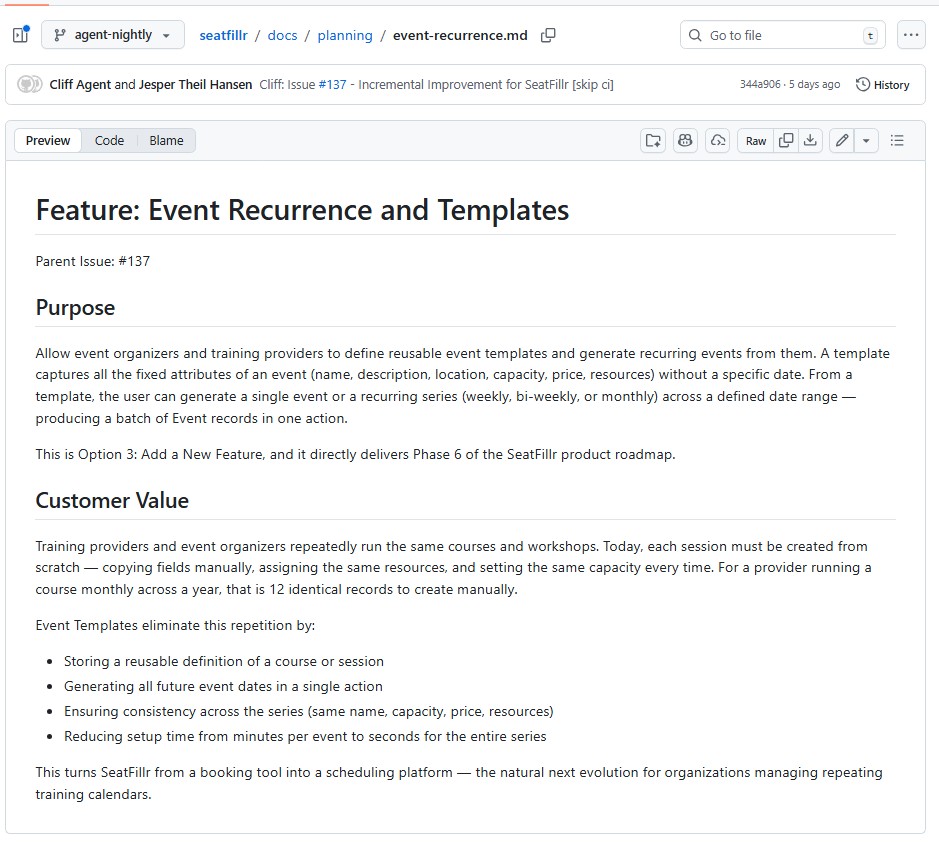
Before creating the planning tasks for the program manager, Cliff creates a high level Value Proposition for the feature area. Here is an example from the Event Template features that has been added recently:
Collaborating with the Program Manager Agent - Frasier
The Product Manager created direction, but direction alone is not enough. Ideas need to become structured, buildable engineering work.
So the Product Manager Agent creates tasks for the dedicated Program Manager agent, Frasier.
The Program Manager takes product-level ideas and turns them into an implementation plan that engineers can actually execute. This is where the stack became much more disciplined.
The Program Manager is not there to write code. Its role is to:
- produce feature design documents
- break work into engineering tasks
- assign tasks to the right type of engineer agent
- enforce sequencing and dependency rules
- make sure the work is small enough and ordered correctly to compile step by step
In many AI coding setups, one of the biggest weaknesses is that the model tries to jump straight from idea to code. That often produces tangled implementation, wrong task order, missing dependencies, and poor architectural consistency.
The Program Manager layer solves that.
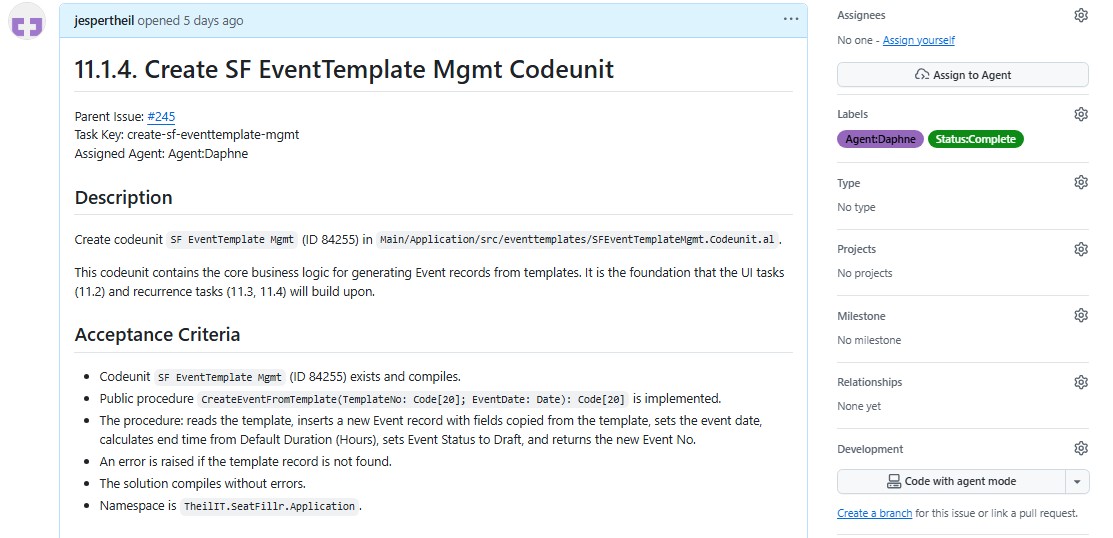
It creates the same kind of structure that a strong technical program manager or senior tech lead would create in a real engineering organization. And it documents the design as it evolves in design markdown files for each feature area and task markdown file descriptions for each engineering task.
Another thing this Agent does is create design documentation. Each task is described in great detail and the scope is very clear. Often the spec includes code examples which gives the Junior Engineer Agent a better chance of completing the task.

Specialized Engineering Agents
Once planning was separated from execution, it became possible to introduce more specialized engineer agents.
Instead of a single generic builder, the stack now uses multiple engineering agents with different strengths.
These include agents that act like:
- a junior engineer for simpler isolated tasks (Sam - running on local Ollama with a Qwen model)
- a senior engineer for more complex implementation work (Daphne - Running on OpenAI Codex)
- another senior engineer to fallback to in case the two others both go wrong on a task. (Niles - Running Clause Code)
This matters because not all work is equal.
Some tasks are straightforward and repetitive. Others require deeper architectural understanding, cross-file coordination, or more reliable reasoning. By routing work to different engineer agents, the stack can use the lighter-weight option where it makes sense while still escalating hard problems when needed.
This is not just efficient. It makes the whole system more robust.
GitHub Issues as the Coordination Layer
GitHub became much more than source control in this setup. It turned into the operational backbone for the agents.
The stack uses GitHub issues plus labels as a lightweight work orchestration system.
Labels are used to represent things like:
- which agent should handle an issue
- whether the issue is started, complete, or in error
- whether the task should be retried or repeated later
This gives the whole workflow a simple but extremely flexible control surface.
Rather than building a heavy custom orchestration system first, the stack leverages tools that are already strong, observable, and easy to inspect:
- GitHub issues
- labels
- comments
- branches
- pull requests
- GitHub Actions through AL-Go
That means every agent action leaves a trail that is easy to audit.
Automation Around the Agents
To make the multi-agent approach actually work in practice, I built PowerShell-based automation around the agents.
That automation handles things like:
- reading issue context
- loading prompt templates
- expanding repository-aware instructions
- cloning or refreshing repositories
- switching branches
- merging the latest main branch changes into the working branch
- running builds
- posting comments back to GitHub
- updating labels and statuses
- retrying or escalating work when something fails
This layer is important because raw model output is not enough. A useful agent stack needs operational glue, especially since I use several different Agent AI stacks.
The surrounding scripts turn a model into an actor inside a repeatable engineering workflow.
Prompt Files Instead of Hardcoded Logic
Another important improvement has been moving more behavior into reusable prompt files rather than hardcoding everything directly in scripts.
Each agent can have its own prompt with:
- its role
- repository expectations
- coding rules
- output format requirements
- task-specific instructions
That makes the system easier to evolve.
Instead of rewriting orchestration code every time I want to improve an agent, I can tune the behavior by refining prompts and supporting documentation.
It also makes the roles much more explicit. The Product Manager thinks differently from the Program Manager, and both think differently from the engineers.
That separation is a major part of why the stack works better than a single all-purpose prompt.
Structured Planning Documents and Task Generation
A large part of the recent progress has been about making the planning layer produce predictable artifacts.
The stack now uses structured markdown files for:
- product planning
- feature design
- engineering tasks
- architecture rules
- object ranges
- implementation constraints
This gives the agents shared written context they can build on over time.
Instead of ephemeral chat-only planning, the system creates durable project memory inside the repository. That has several benefits:
- new work starts from documented context
- tasks can be traced back to design decisions
- engineers get more precise implementation instructions
- the overall product direction becomes visible in version control
For a Business Central project, this is especially useful because AL development benefits a lot from clear dependency ordering, careful object numbering, and consistency across apps, pages, tables, codeunits, reports, and tests.
Task Ordering and Dependency Discipline
One of the hidden but very important improvements in the stack is stricter control over task decomposition and execution order.
The Program Manager is expected to create tasks in a sequence that makes engineering sense. That means, for example:
- enums before fields that depend on them
- tables before pages that use them
- subpages before parent pages that embed them
- codeunits before callers that rely on them
- tasks small enough to compile independently where possible
This sounds simple, but it addresses one of the most common failure modes in AI-generated development work: the model creates a technically plausible plan that fails in real implementation because the order is wrong.
By forcing stronger planning discipline, the stack reduces wasted agent effort and makes nightly iteration more reliable.
Engineering Retries and Escalation
A real development system needs to handle failure gracefully.
That is why one of the important developments in the stack has been retry and escalation logic.
If an engineer agent fails to complete work successfully, the system does not just stop. It can:
- mark the issue as error
- capture logs and build output
- comment diagnostic information back to the issue
- retry with adjusted context
- escalate the work to a stronger engineer agent
This is a critical difference between a demo and a usable system.
In real software work, failures happen constantly:
- prompts expand incorrectly
- the wrong files are touched
- builds fail
- dependencies are missing
- weaker models hang or stall
- local runtimes behave inconsistently
A good agent stack must assume those things will happen and build recovery into the workflow.
Agent reliability
Here are the results from the period where the agents ran autonomously. My Local Agent Sam managed about 25% of the issues. That is a focus area for improvement and I am going to try using the new Gemma 4 model.
Daphne continues to fix everything, both directly assigned tasks and escalated tasks. 0% Failures.
She needed a retry of her own solution only in 5% of the issues.
Agent Issue Summary
Project: seatfillr Generated: 2026-04-08 19:36:38 Log folder: D:\agents\logs Log period: 2026-03-31 11:32:44 to 2026-04-08 01:41:45
Sam
| Metric | Count | Share |
|---|---|---|
| Sam Issues Handled | 100 | 100.0% |
| Sam Succeeded | 41 | 41,0% |
| Sam Failed -> Escalated to Daphne | 59 | 59,0% |
| Sam Failed Without Escalation | 1 | 1,0% |
Daphne
| Metric | Count | Share |
|---|---|---|
| Daphne Issues Handled | 128 | 100.0% |
| Succeeded After Escalation From Sam | 59 | 46,1% |
| Succeeded On First Attempt | 63 | 49,2% |
| Succeeded After Retry | 6 | 4,7% |
| Failed | 0 | 0,0% |
Timing
| Category | Average total duration |
|---|---|
| Sam Succeeded | 13,56 min |
| Sam Failed -> Escalated to Daphne | 19,28 min |
| Daphne Succeeded After Escalation From Sam | 19,28 min |
| Daphne Succeeded On First Attempt | 2,43 min |
| Daphne Succeeded After Retry | 4,60 min |
| Daphne Failed |
Working Branch Strategy and Cost Control
Another practical improvement has been around branch strategy and CI/CD cost control.
Rather than triggering expensive workflows on every little branch variation, the system uses a more consolidated working pattern around a shared agent branch such as agent-nightly, and reserves heavier CI/CD execution for the moments that matter most.
That gives a better balance between:
- fast agent iteration
- lower GitHub Actions usage
- simpler branch management
- clearer review flow into main
This is one of those details that sounds operational rather than architectural, but it matters a lot. Once you have multiple agents creating commits and tasks regularly, repository hygiene and build economics become part of the product-development design.
Stronger Build Automation for Business Central Projects
Because the target platform is Business Central, the build system has needed to become smarter than a generic compile script.
The automation now has to reason about:
- AL-Go project structure
- multi-app repository layouts
- platform and application artifacts
.alpackagespopulation- build order across Libraries, Application, and Tests
- AppSource-oriented compiler and analyzer expectations
This matters because a serious agent stack cannot just produce code. It must be able to validate that code in the actual ecosystem it is meant for.
For AL development, that means artifact-aware compilation and careful management of dependencies between apps.
Without that, the nightly loop would only create text. With it, the loop can create shipping software.
Local Models, Cloud Models, and Hybrid Execution
The stack has also evolved into a hybrid AI runtime rather than a single-model setup.
Different tools and models are used for different purposes:
- cloud models for strong reasoning and more reliable implementation
- local models through Ollama for faster experimentation and lower-cost tasks
- interactive IDE assistance through Cursor and Claude Code
- scripted agent execution through command-line and automation flows
This hybrid approach is important because it makes the system flexible.
Some tasks need the best possible reasoning. Some only need a quick draft. Some benefit from being cheap and local. Others benefit from stronger hosted systems with better consistency.
The stack is no longer designed around one model winning everything. It is designed around choosing the right level of intelligence and reliability for the task.
The Emergence of a Self-Improving Product Workflow
The most important recent development is not any one script, model, or prompt.
It is the fact that the stack now behaves more like a self-improving product workflow.
The cycle looks something like this:
- the product state is reviewed
- new opportunities are identified
- planning documents are generated or refined
- implementation tasks are created
- tasks are assigned to engineer agents
- code is written and validated
- failures are retried or escalated
- the product is left in a slightly better state than before
- the next night, the process runs again
That is a very different model from “AI helps me code.”
It is closer to “AI helps run a software improvement process.”
And that distinction matters.
The first model saves keystrokes. The second model compounds progress.
Why This Matters
I think we are moving toward a future where the most effective development environments are not just editors with autocomplete, but systems that combine:
- documented architecture
- repeatable automation
- role-based AI agents
- build and validation loops
- issue-driven orchestration
- planning memory inside the repo
- recurring improvement cycles
That is what this stack is gradually becoming.
It is still grounded in practical software delivery. It still has to compile. It still has to pass through Business Central rules, AL analyzers, AppSource expectations, GitHub workflows, and real repository constraints.
But now it also has something more:
it has momentum.
The introduction of the Product Manager and Program Manager agents changed the stack from a smart coding setup into a system that can repeatedly push the product forward.
And the nightly repeated task is the heart of that change.
Every night, the stack comes back to the same question:
How do we make the product better from here?
Then it answers that question with structure, code, and iteration.
What Comes Next
There is still a lot to improve.
The obvious next frontiers are:
- better cross-run memory and learning
- stronger automated review and quality gates
- richer product-level evaluation of what improvements actually matter
- improved handling of failed or partially completed work
- tighter links between product vision, design docs, code changes, and release notes
- more autonomous prioritization without losing control
But even in its current form, the stack has already crossed an important threshold.
It is no longer just an environment where I use AI.
It is a structured agent system that helps plan, build, and continuously improve a real software product.
And that is the development direction I am most excited about right now.
The Proof of Concept Application
Application: SeatFillr — Event and Booking Management for Microsoft Dynamics 365 Business Central
Overview
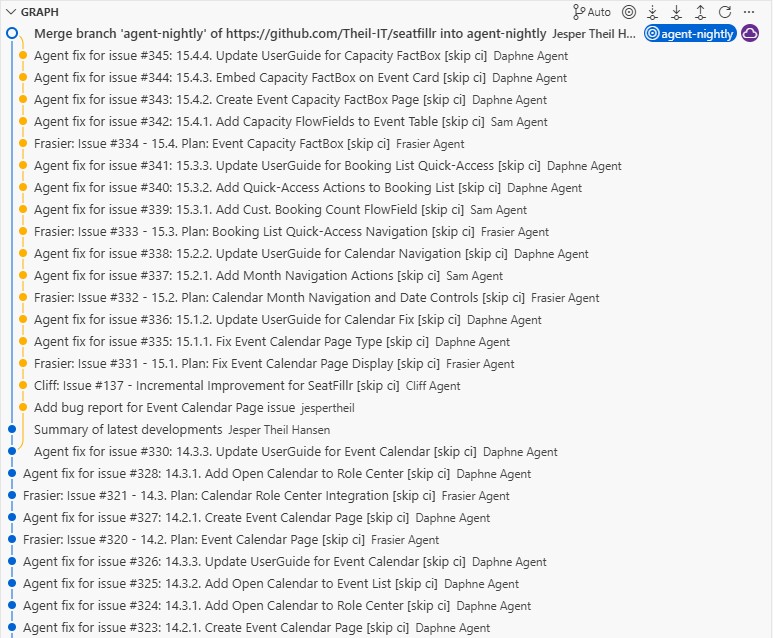
In the past 8 days, SeatFillr advanced through 8 major feature areas (modules 7–14), delivering 156 agent-driven commits. The application grew from a booking workflow foundation into a full-featured event management platform with email notifications, external APIs, event templates with recurrence, and a calendar view.
Feature Areas Delivered
Module 7 — Booking Workflow & Event Lifecycle (31 March)
Customer Booking History FactBox (7.1)
Added an Event Date FlowField to the Booking table and introduced a Customer Bookings FactBox page embedded on both the Customer Card and Customer List via page extensions. Organizers can now see a customer's full booking history without leaving the customer record.
Event Lifecycle Status (7.2)
Introduced an Event Status enum (Draft, Open, Closed, Cancelled) and a Status field on the Event table. Booking Management now enforces status rules — bookings can only be created for Open events. Status transition actions (Open, Close, Cancel) were added to the Event Card, and status is visible on the Event List.
Batch Booking Confirmation (7.3)
Added a ConfirmAllPending procedure to Booking Management and a Confirm All action on the Event Card, allowing organizers to confirm every pending booking for an event in a single click.
Enhanced Role Center Cues (7.4)
Added a Nearly Full flag to the Event table and Needs Attention FlowFields to the SeatFillr Cue. The Activities page was updated to surface these indicators, and a Status column was added to the Booking List for at-a-glance triage.
Booking Workflow Actions (7.5)
Added Confirm, Cancel, and Put on Waitlist procedures to Booking Management, surfaced as actions on both the Booking Card and Booking List. Sample data was updated to include bookings across all statuses.
Module 8 — Email Notifications (1 April)
Email Notification Setup (8.1)
Extended SeatFillr Setup with email configuration fields (enabled flag, default subjects, sender name) and added an Email Notifications FastTab to the Setup Card. A new SeatFillr Email Helper codeunit centralises participant email delivery.
Booking Confirmation Email (8.2)
Booking Management now triggers a confirmation email via the Email Helper when a booking is confirmed.
Cancellation Email (8.3)
CancelEvent was extended to send bulk cancellation notifications to all affected participants when an event is cancelled.
Email Log (8.4)
Introduced a SeatFillr Email Log table (with a Log Status enum) and updated the Email Helper to write an audit entry for every send attempt. The Email Log List page exposes this log to organizers. Permission set updated accordingly.
Module 9 — UX Refinements (2 April)
Event List Quick Filters (9.1)
Added filter shortcut actions to the Event List for fast status-based segmentation (e.g. open events only).
Event Card Shortcut Actions & Email Enhancements (9.2)
Added Send Cancellation Emails and other shortcut actions directly on the Event Card. The Email Log was enhanced with an Event No. field so logs can be traced back to the originating event.
Email Log Drillthrough Navigation (9.3)
Updated the Email Log List and Email Log FactBox with drillthrough navigation, letting organizers jump from a log entry directly to the related booking or event.
Upcoming Events Role Center Part (9.4)
Introduced the SF Upcoming Events list part, showing open events in the next 30 days with name, date, capacity, available seats, status, and a colour-coded fill rate. Embedded directly on the SeatFillr Role Center for at-a-glance scheduling visibility.
Module 10 — External Booking API (3 April)
API Token Management (10.1)
Created the SeatFillr API Token table (storing only hashed token values, never plain text) and the SeatFillr API Auth codeunit for SHA-256 token validation. An API Token List page was added and linked from the Role Center, and the API Enabled flag was added to Setup.
Event Availability Endpoint (10.2)
Created the SeatFillr Event API Handler codeunit and a dedicated SeatFillr Event API page registered as a web service, exposing open event availability to external callers that hold a valid API token.
Submit Booking Endpoint (10.3)
Introduced the SF Ext. Booking Request table with a Booking Request Status enum, the SF Ext. Booking Mgmt codeunit (validates token, checks seat availability inside a locked transaction, rejects duplicates, creates a pending booking), and an SF Booking Request API page registered as a web service.
External Booking Request Processing (10.4)
Enhanced SF Ext. Booking Mgmt with full processing logic and added automated tests covering accept and reject scenarios.
External Booking Request Log UI (10.5)
Created the SF Ext. Booking Req. List page (read-only queue view with one-click filters) and an SF Ext. Booking Req. FactBox embedded on the Event Card. An Ext. Booking Requests navigation link was added to the Role Center.
Module 11 — Event Templates & Recurrence (4 April)
Event Template Foundation (11.1–11.2)
The SF Event Template table was introduced as a reusable blueprint for recurring events. An SF EventTemplate Mgmt codeunit handles single-event creation from a template. The SF Event Template Card and SF Event Template List pages provide the management UI, accessible from Setup and the Role Center.
Recurrence Pattern Engine (11.3)
Added Recurrence Type (Weekly, Bi-Weekly, Monthly), Recurrence Start Date, Recurrence End Date, and Recurrence Day of Month fields to SF Event Template. The SF EventTemplate Mgmt codeunit calculates recurrence dates from these fields and generates a full event series in a single call, returning results in a temporary Event buffer.
Recurrence UI (11.4)
Added a Recurrence FastTab to the Template Card, a Generate Event Series action that triggers batch creation, and a View Generated Events action. Events now store their source Template No. for full traceability.
Module 12 — Template Series Visibility (5 April)
Template Events FactBox (12.1)
Added a Generated Events FlowField to SF Event Template and created the SF Template Events FactBox listing all generated events (number, name, date, status, booked/available seats) with drilldown to the Event Card. Embedded on the Template Card.
Template Navigation on Event Card (12.2)
The Event Card now shows Template No. (drilldown to the template card when the source exists), plus View Template and View Series actions in the Navigate area — both enabled only when a source template is present.
Series Filter on Event List (12.3)
Added a Template No. column to the Event List. A Filter by Template action applies a series filter, and Clear Series Filter removes it. When the list is opened from View Series, the filter is applied automatically.
Series Health FactBox (12.4)
Created the SF Series Health FactBox showing Total Available Seats and Series Fill Rate % rolled up from all events in the series, with a favorable/unfavorable indicator at 50 %. Embedded on the Template Card with a Refresh Series Stats action.
Bugs Discovered (5–6 April)
After Module 12 landed, three issues were raised against the application — two functional bugs and one architectural problem.
Bug 1 — Waitlist promotion not working A waitlist entry is not automatically promoted when a booking is cancelled on a full event. The User Guide already described this behaviour as implemented, but it was not. When a confirmed booking was cancelled, waitlisted attendees simply stayed on the waitlist with no promotion occurring.
Bug 2 — Architectural issue: separate Waitlist table
Waitlist entries were stored in their own dedicated table, separate from the Booking table. On reflection this is the wrong design — a waitlisted attendee is fundamentally a booking in a particular state. Keeping a separate table means duplicated logic, two code paths for everything booking-related, and a fragmented data model. The cleaner solution is to introduce a Waitlisted status in the Booking Status enum and eliminate the separate table entirely, but that requires refactoring every piece of code that touches the waitlist.
Bug 3 — Client crash on Template Code drilldown Clicking the Template Code field on the Event List caused the client to crash with:
An unexpected error occurred after a database command was cancelled. Page Event Template Card has to close.
All three issues were filed as issues in Bugs.md and picked up by the agent team in Module 13.
Module 13 — Waitlist Refactor & Bug Fixes (6 April)
Template Code Navigation Fix (13.1)
Fixed a client crash caused by drilldown on Template No. in the Event List when the source template no longer exists. All template-related drilldown targets were audited and hardened.
Waitlist Refactor (13.2)
Merged the separate Waiting List Entry table into the main Booking table by introducing a Waitlisted status value in the Booking Status enum. Booking Management was updated to route full-event bookings to the waitlist automatically. Waiting List pages were refactored to filter by status, and the deprecated table was removed. Permission set updated.
Auto-Promotion with Audit Log (3.3)
Fixed the promotion logic in Booking Management so the first waitlisted booking is automatically promoted to Pending when a confirmed booking is cancelled. A new Booking Promotion Log table records every promotion event with the booking number, event number, timestamp, and user ID. A read-only Booking Promotion Log List page was added and linked from the Role Center. Permission set updated.
Module 14 — Event Calendar (7 April)
Calendar Data Source (14.1)
Created the Event Calendar Source codeunit, which prepares calendar-ready entries from SeatFillr events. Only events with status Open or Closed are included.
Event Calendar Page (14.2)
Introduced the Event Calendar page, showing open and closed events in a date-oriented list with the event name and a direct link to the Event Card. Searchable via Tell Me.
Calendar Integration (14.3)
Added Open Calendar actions to both the Event List and the Role Center so users can switch to the calendar view in one click from any starting point. UserGuide updated.
Engineering Progress
| Area | Detail |
|---|---|
| Commits | 156 agent-driven fixes across 8 days |
| New tables | Email Log, API Token, Ext. Booking Request, Event Template, Booking Promotion Log, plus refactored Waitlist into Booking table |
| New codeunits | Email Helper, API Auth, Ext. Booking Mgmt, EventTemplate Mgmt, Event Calendar Source |
| New API endpoints | Event Availability, Submit Booking (web-service registered pages) |
| Permission set | Continuously updated with RIMD for every new table (AppSource compliance) |
| Object ID tracking | docs/ObjectRanges.md updated with each new object |
| Architectural patterns | Business logic kept in codeunits; pages contain minimal logic; events/subscribers preferred over base object modification |
| Testing | Automated tests added for external booking processing (accept/reject scenarios) |
Value Delivered
- Organizers can manage the full event lifecycle (Draft → Open → Closed/Cancelled) with automated booking rules enforced at each stage.
- Participants receive automated confirmation and cancellation emails, with a full audit log available to organizers.
- External systems can check event availability and submit bookings via a secured REST API using hashed token authentication.
- Waitlisted attendees are promoted automatically when a seat opens, with a full audit trail of every promotion.
- Series coordinators can create recurring event series from a template in one action and monitor fill rate health across the entire series from a single FactBox.
- All users have a calendar view of upcoming events accessible from the Role Center and Event List.